Sunkenland Update v0.8.30 Patch Notes (24th July 2026)
Sunkenland's latest patch lets you roll back to older character saves, fixes Eva's quest tracking, and stops ships from sinking too fast.
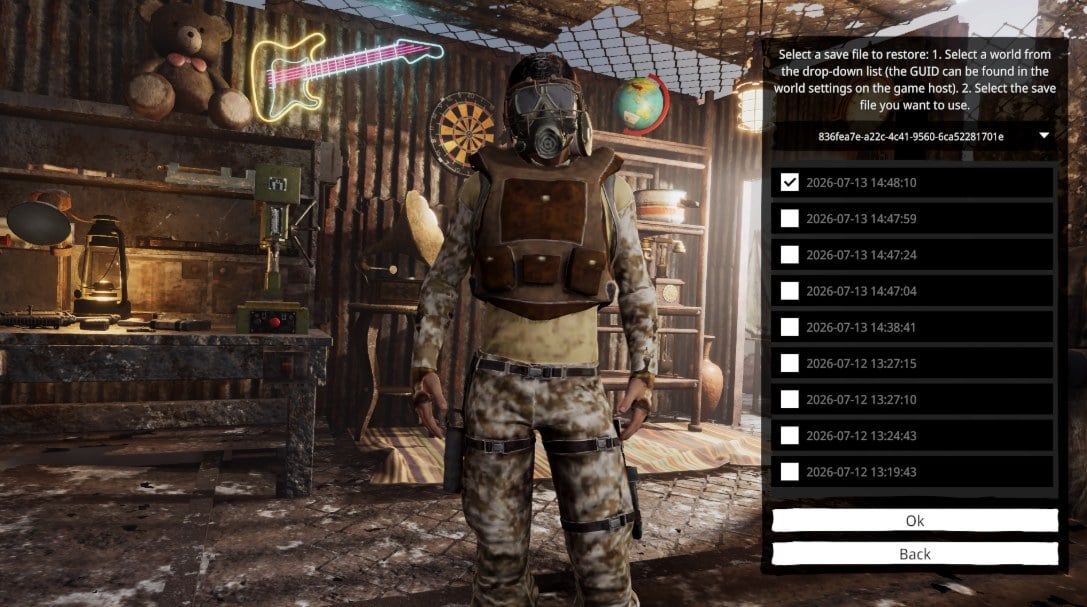
Sunkenland's v0.8.30 update is live, and the headline feature addresses one of survival gaming's most painful moments: the accidental save you can't undo. The new Character Save History Restore tool lets you pull from up to nine historical saves, replacing your current one if disaster strikes. It's a safety net that should ease some of the tension baked into losing a base to poor planning or bad luck.
Beyond that, Vector3 Studio has tackled a couple of friction points. NPC Eva's quest status now tracks properly as you progress, which matters if her dialogue or objectives felt stuck before. Ships that were sinking too fast have also been rebalanced, giving you more time to salvage or repair rather than watching your vessel vanish in seconds.
The patch also expands dedicated server flexibility with custom save path support, letting admins point servers to specific directories using the -steamID launch parameter. Map colours for neutral islands have been corrected as well. The full list, including dedicated server configuration details, is below.
Full Patch Notes
✓ FixBug Fixes
- Fixed an issue where NPC Eva's status would not update with quest progression.
- Fixed an issue where heavily damaged ships would sink and be destroyed too quickly.
- Fixed incorrect map colors for neutral islands.
New Features
Character Save History Restore
We've added a Character Save History Restore feature, allowing you to restore previous character saves. You can choose from up to 9 historical save files to replace your latest save.
Please use this feature with caution. The restore option can be accessed from the Character Selection screen.
How to use:
- Select the desired world from the drop-down list. (The World GUID can be found in the host world settings.)
- Choose the save file you want to restore.
- Click Confirm.
Note: Due to current save system limitations, world names cannot be displayed at this time. Support for displaying world names and restoring world save history will be added in a future update.
Dedicated Server
Added support for custom save paths.
When launching the dedicated server with the launch parameter:
-steamID <Your_64bit_SteamID>
save files will be loaded from:
C:\Users\<Your_User_Name>\AppData\LocalLow\Vector3 Studio\Sunkenland\Worlds
If the parameter is not specified, the server will continue loading saves from the default location:
C:\Users\<Your_User_Name>\AppData\LocalLow\Vector3 Studio\Sunkenland\SteamCloudData\<Your_64bit_SteamID>\Worlds
Please read the updated Dedicated Server Manual before configuring your server scripts.
Sources
Stay on top of every update — find all the latest patch notes and gaming news at XP Gained. Join our Discord for live patch note alerts and discussion.
Written by
Nathan LeesGaming journalist and founder of XP Gained. Covering patch notes, breaking news, and updates across 160+ games.
Related Posts

Sunkenland 0.8.41 Patch Notes (31st July 2026)
The latest Sunkenland patch closes several exploits affecting weapons and multiplayer progression, whilst opening Eden Island for construction and adding new loot locations.

Sunkenland 0.8.40 Patch Notes: Quest and Save File Fixes (28th July 2026)
Update 0.8.40 patches five blocking bugs that trapped players mid-quest and lost items, plus introduces a save file restore feature for both single-player and dedicated servers.
Sunkenland Update v0.8.24 Patch Notes (22nd July 2026)
The latest Sunkenland patch tackles a string of progression blockers and combat frustrations that were preventing players from advancing through the final quest island.