Phasmophobia - Player Character Update 0.17.0.0 Notes (5th May 2026)
Phasmophobia's biggest character overhaul yet is live, bringing 12 new models, full cosmetic customisation, and a wrist watch that tracks your sanity mid-contract.
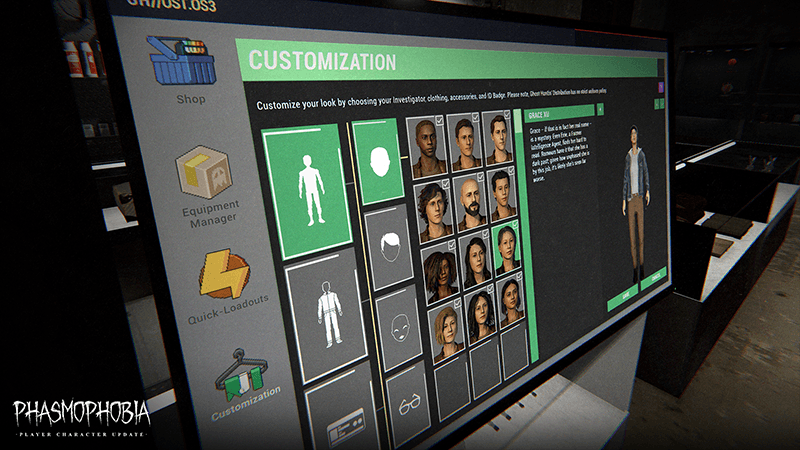
Twelve new character models, a full cosmetics system, and a wrist watch that lets you monitor your sanity without opening a menu, Phasmophobia's Player Character Update 0.17.0.0 is a substantial overhaul to how the game looks and feels to actually play. It's out now across all platforms.
The cosmetics side is the headline, and I'll admit I was bracing for a monetisation nightmare. It isn't, every item is either unlocked through gameplay or bought with in-game currency, which is exactly how it should work. Beyond cosmetics, character animations now cover equipment interactions and deaths, physics have been added to doors so they swing freely after you let go, and the old post-death holding room is gone in favour of a direct transition to the dead state. Small changes individually, but together they make the game feel noticeably less clunky.
There's a known issues list that's long enough to warrant attention, with a follow-up patch already scheduled for May 12th to address the most disruptive ones. Full patch notes below.
Full Patch Notes
▲ Buff▼ Nerf✓ Fix◆ TweakWelcome back, Ghost Hunters.
Today we’ve released the Player Character Update for Phasmophobia. The update is out now on all platforms where Phasmophobia is available.
Patch notes are available below.
New
- Characters: 12 new, higher quality character models (6 male, 6 female) with character bios, adjustable hair colour and more.
- Cosmetics: A wide array of available cosmetic items to equip your chosen character with; coats, shirts and trousers, all with multiple colour options. Unique shirts for prestige and event specific achievements. Accessories such as piercings, hats and glasses are also available. Note: All cosmetics are either unlockable in-game or purchased with in-game currency.
- Animations: Alongside the new character models, interactions with equipment, objects and the environment will now feature character animations. Upon dying, a new death animation will also be seen.
- PC VR Players can enable/disable new first-person death animations with the ‘immersive animations’ toggle in the options menu, as seen below. If disabled, which is the default, the new death animation will be seen in third-person.
- Player Watch: A watch has been added to the character models that can be used during contracts to monitor player sanity levels and keep track of time elapsed during the contract. To view the watch in full, players can hold the Use button when their left hand is empty or by opening their Journal. The watch will not display Sanity if the Sanity Monitor is disabled, nor will it count as a piece of electronic equipment for Ghost abilities.
- For VR Players, the watch will always be visible and can be viewed by simply raising their left hand up.
Changes
- ID Cards: ID Cards and Badges are now equipped and swapped within the customisation Shop menu, rather than the main menu.
- Death Room: The room a player will enter after being killed by the Ghost has been removed, with the player now seamlessly transitioning to the Dead state.
- Player’s Journal: The Journal will now appear in game when being used, rather than being a separate UI item.
- The Prestige limit has been increased to 4000.
- Note: No additional unlocks are available after Prestige 20.
- The inventory belt has been removed, with all items now placed on the character model.
- The teleport movement circle will now render on top of other objects and will be invisible until the player presses the teleport button when at full stamina.
Fixes
- Fixed an issue that caused Head Gear to not be visible on all FOV values.
- Fixed an issue in Prison where wishing for a trap with the Monkey’s Paw wouldn’t affect sliding doors.
- Fixed an issue where the Raiju’s hunt threshold would only increase if equipment was held.
- Fixed an issue where the Yokai could hear the Music Box from too far away.
- Fixed an issue where the Jinn could drain sanity from a player in rooms above and below it.
- Fixed an issue in VR where a player’s Journal could be seen after that player had died.
- Fixed an issue in VR that caused player hands to shake.
- Fixed an issue in VR that caused difficulty picking up the Spirit Box from the van wall.
- Fixed an issue in VR that caused Salt to rotate with the player’s body, rather than hand.
- Fixed an issue in VR where players could interact with objects without teleport grab selected.
- Fixed an issue in VR where the player would be unable to scroll through the Journal in the lobby.
- Fixed an issue in VR where players would appear to slide down stairs when using teleport locomotion.
- Fixed an issue in VR where players could grab items through walls.
- Fixed an issue in VR that caused the Tier 3 Firelight to be held upside down.
- Fixed an issue in VR that caused the Tier 3 Firelight to float in mid-air for players in Multiplayer.
- Fixed an issue in VR that caused players to be able to teleport out of the Van at the end of the tutorial and skip areas.
- Fixed an issue in VR that made it difficult to interact with UI elements.
- Fixed an issue in VR that caused doors to push players aside.
- Fixed an issue in VR that caused the T1 Head Gear to fall off players when viewing the CCTV.
- Fixed an issue in VR that caused player’s models to become misaligned with their position.
- Various other fixes and improvements.
The below are issues that we are aware of in-game and currently investigating a fix. In some cases, a fix is already planned for a future update. Please do submit any issues, outside of the below, you encounter to our team via our Support Centre as any and all information can help our team find a fix.
Known Issues
- Players are unable to use the Journal while dying.
- ‘Use’ animations may continue if the equipment is dropped mid-animation.
- A drop in frame-rate occurs in the customisation menu.
- Players will be invisible on CCTV through another player’s Tier 1 Head Gear.
- Flashlights will remain in the player's hand when using a Tier 1 Photo Camera.
- The Video Camera can be moved away from the player when switched out while in use.
- The character model's eyes will be wide open after the player has died.
- The custom difficulty setting “Doors starting open” will only work on Tanglewood.
- Footstep audio will not correctly match the player's speed when sprinting or crouching.
- Doors can be held shut by players holding items.
- VR and Non-VR players can’t hear each others footsteps.
- Various minor visual inconsistencies.
The following issues, as well as other known bugs, will be fixed with the launch of Phasmophobia's next update on May 12th, 2026:
- Items placed during a pickup animation will instead be placed at the previous placed position.
- Pressing cancel on the hair customisation screen will apply the hair to the previously selected character.
- Yurei’s door closing ability will not fully close the door.
- Some ID Card badge icons become white if the player selects a badge that only has one unlock out of two.
- Grabbing a Flashlight with a prop in-hand will cause the flashlight to be held at the player’s feet.
- Meg Marr’s hair is bald when wearing a hat.
- The Ouija Board and Haunted Mirror will drop sideways instead of flat on the ground.
- Doors will not open correctly while holding the Tarot Cards.
- If revived while crouching, the character rig will display incorrectly.
- Head Gear will visually stutter when the player is crouched.
- Equipment will visually stutter when the player is rotating.
- Tier 3 Video Camera blocks too much of the screen on the right hand side.
- Player model will ragdoll more than intended upon dying.
- Hunted and Suburbanite descriptions have been corrected.
- Animated ID Card & Badges will be displayed correctly.
- VR Players feet will sink into the ground when crouched.
- VR Players are unable to open the left hand closet door in the upstairs hallway of 10 Ridgeview Court.
We will also be making the following changes as part of the same update:
- Removing the equipment switching animation to allow for instant switching.
- Salt will be placed instantly instead of after the animation has finished.
- Equipment will be moved closer to the screen for easier readability.
- Player head rotation will now have a limit for looking up and down for Multiplayer, locally there is still no limit.
- Various other visual and gameplay adjustments and improvements.
As you continue your investigations in Phasmophobia, if you encounter bugs, issues or simply have feedback for our team, please use our Support Centre to submit your reports.
Sources
Stay on top of every update — find all the latest patch notes and gaming news at XP Gained. Join our Discord for live patch note alerts and discussion.
Written by
Nathan LeesGaming journalist and founder of XP Gained. Covering patch notes, breaking news, and updates across 160+ games.
Related Posts

Phasmophobia v0.18.0.1 - Patch Notes (28th July 2026)
A week after the photo camera's debut, Phasmophobia v0.18.0.1 pulls back to fix the problems it introduced. Particularly its interference with other players' animations and a handful of multiplayer physics issues.

Phasmophobia - Hotfix v0.17.1.5 Patch Notes (3rd June 2026)
Kinetic Games drops a small but important hotfix, unblocking controller players stuck on the Spirit Box and restoring Voice Recognition for Steam.

Phasmophobia v0.17.1.4 - Patch Notes (2nd June 2026)
Kinetic Games rolls back one of the more controversial changes from the Player Character Update and fixes a handful of nasty bugs in today's Phasmophobia patch.