RuneScape Official Plugins - Batch 3 Patch Notes (19th November 2026)
Jagex has released Batch 3 of RuneScape's official plugin hub, introducing Clue Trainer and eight other community tools alongside critical crash fixes.
Jagex has deployed Batch 3 of the official RuneScape plugin hub, adding eight new community-created utilities to the game. The new plugins include Clue Trainer by Zyklop Marco. Clue Trainer offers teleport and pathing recommendations, highlights, compass triangulation, scan clue assistance and puzzle-solving overlays. The plugin version starts at version 83, following 82 versions of Clue Trainer for Alt1.
The update also introduces Better Teleport UIs by WerWolv, Banking+ by TheJoshJ, Bank Evaluator by Pavy, Archaeology Assistant by Brad, Rotation Master by IMEllamental, Bronzeman by Zippilipy, and RSprite by SereSelene. Banking+ is a suite of three plugins, Bank Tags, Bank Cleaner and Advanced Bank Search, with two dependency plugins including Bank Utils Core and RuneQL. Updates will shortly become available for Upkeeps, Drop Log, Perk Calc, Farming Timer, Ground Items, Highlighter, PrettyUI, Agility Helper, and WikiSync.
Jagex's crash reports update dated 19th November said the team suspected the crashes were related to plugins with dependencies. A fix for crashes specifically was deployed in the 17:30 update. Jagex recommended restarting the client if using plugins. As a workaround, it advised deleting all folders in the plugins folder and then reinstalling the plugins. Jagex said the crashes were not the fault of specific plugins or developers involved.
Jagex's QA team flagged further issues. Some plugins can take up to 10 seconds to disable. Disabling PrettyUI with many dependent plugins installed will freeze the screen for a minute and then log the player out. Logging out, logging to lobby or switching worlds with all plugins installed can take up to one minute and will look like the game has frozen. Jagex stated that some of these may be resolved by updates to plugins and others may need further investigation on its side. Jagex said it does not have dates to share for planned UX improvements, including an update all button and icon support for plugins, because the team is primarily focused on stability to resolve crash reports.
Full Patch Notes
▲ Buff◆ TweakRuneScape Official Plugins - Batch 3 Out Now!
Community
Crash Reports - 19th November
UPDATE - 15:30PM. The team are still discussing the crashes based on your reports. At the moment, we suspect its related to plugins with dependencies. Were currently creating a test environment where we can reliably replicate the issue locally to diagnose the root cause. We may temporarily hide certain plugins during testing (preventing them from being installed or searched) as an interim solution. Please note, this is not the fault of specific plugins or developers involved, it seems be related to dependencies and plugins.
UPDATE - 16:30PM. The team has made some progress on diagnosing the issue and a fix is in testing. Well update you as testing progresses. Thanks for your patience.
UPDATE - 17:30PM The fix for crashes specifically has now been deployed. We recommend restarting your client if youre using plugins, and if youre not then you can continue as normal.
If you still experience issues after restarting, please let us know and well go back to our investigation.
The following workaround should work if you still experience crashes after the fix has been deployed:
Navigate to the C:\ProgramData\Jagex\RuneScape\plugins folder of your computer and delete all folders (e.g. 6398181), which will uninstall all plugins, then re-install them. If youre on Steam its: %steamapps%/common/RuneScape/plugins. This should not remove any plugin saved settings. Windows normally hides this path, so you may need to paste this path into file browser. If you are not using Windows, then the equivalent path is the \Plugins folder of your jagex cache.
Please note, we dont recommend you to delete PluginData.db as it stores your plugin settings.
Once thats sorted, youll just need to reinstall your plugins for it to work again as intended.
UPDATE - 18:00 PM Some notes on issues flagged by our QA team:
Some plugins can take up to 10 seconds to disable, e.g large sizes or dependent on your PC specs. On top of that it can take too long to enable/disable the plugin if you have too many installed which can force you back to the main menu.
PrettyUI - having many plugins installed depending on PrettyUI and trying to disable it will freeze the screen for a minute and then log you out.
Having all plugins installed and logging out/logging to lobby/switching worlds can take up to 1 minute to do it and will look like the game has froze (its not crashed but looks like it has, players just have to wait).
Some of these may be resolved by updates to plugins and others may need further investigation our side.
Batch 3 Plugins are here, bringing another exciting selection of community-created plugins to RuneScape.
In this batch, were launching 8 new plugins, including the highly anticipated Clue Trainer, a bunch of plugins to help you with your bank, and much more:
- Clue Trainer by Zyklop Marco
- Better Teleport UIs by WerWolv
- Banking+ by TheJoshJ
- (A suite of three plugins: Bank Tags, Bank Cleaner and Advanced Bank Search and two dependency plugins including Bank Utils Core and RuneQL)
- Bank Evaluator by Pavy
- Archaeology Assistant by Brad
- Rotation Master by IMEllamental
- Bronzeman by Zippilipy
- RSprite (a dependency/library plugin) by SereSelene
As always, these plugins have been brought to life by an incredibly talented group of community developers. If you encounter any issue with a plugin, or want to share your feedback directly to the developer, head over to the plugins mod.io page to report it. Weve also linked these in the title of each plugin to make it easier to find.
Were also launching updates to existing plugins. Updates will shortly become available for:
- Upkeeps 1.3.0
- Drop Log 1.0.0
- Perk Calc 1.3
- Farming Timer 1.0.1
- Ground Items 1.7
- Highlighter 1.0.13
- PrettyUI 1.3.0
- Agility Helper 1.4.0
- WikiSync 1.1.1
Updating your plugin to the latest version will allow you to receive some of the fixes and improvements that our community developers have been working on in response to your feedback. Please note, there is still a risk of crashes when updating your plugins, however this is not widespread. If you encounter any issues, uninstalling and reinstalling the plugin should work.
Behind the scenes, were looking to improve UI/UX within the Plugin Hub. This includes adding an update all button for plugins, as well as icon support for plugins (rather than just their initials), and vertical scrolling rather than horizontal. We dont have dates to share yet on when this will be implemented because the team is primarily focused on stability to resolve crash reports. However, work is ongoing to improve UX, and we appreciate all of your feedback and patience as we improve the Plugin Hub even further.
If youre curious about plugin development or anything related to our process of implementing plugins, wed love to welcome you into our Plugin Developer community Discord where you can chat directly with our team and our community of plugin developers.
Created by Zyklop Marco
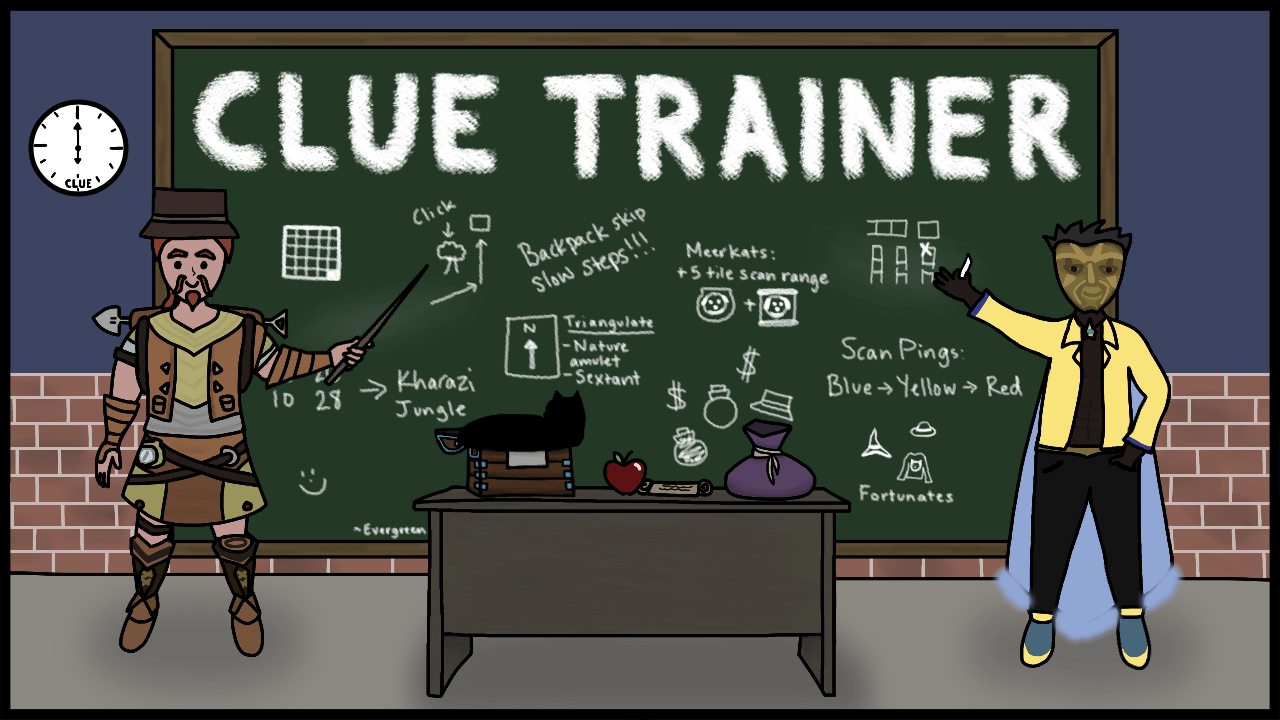 Special shoutout to Evergreen for this beautiful artwork!
When Clue Trainer? Clue Trainer, when?
Well, everyone, the wait is over. Clue Trainer is here to make solving clues easier than ever!
Clue Trainer offers teleport and pathing recommendations, highlights, compass triangulation, scan clue assistance and puzzle-solving overlays.
Whether you're a seasoned clue hunter or just getting started, there's plenty here to help you tackle your next Treasure Trail!
This has been a mammoth project, and we want to give a very special shoutout to Zyklop for the incredible amount of time, effort and dedication he's poured into Clue Trainer. As we've mentioned in previous updates, bringing a plugin of this scale to life hasn't been without challenges. Zyklop has continuously brought solutions to navigate complex technical difficulties, with a huge amount of work happening behind the scenes to facilitate Clue Trainer. We're thrilled to see this plugin now finally in your hands!

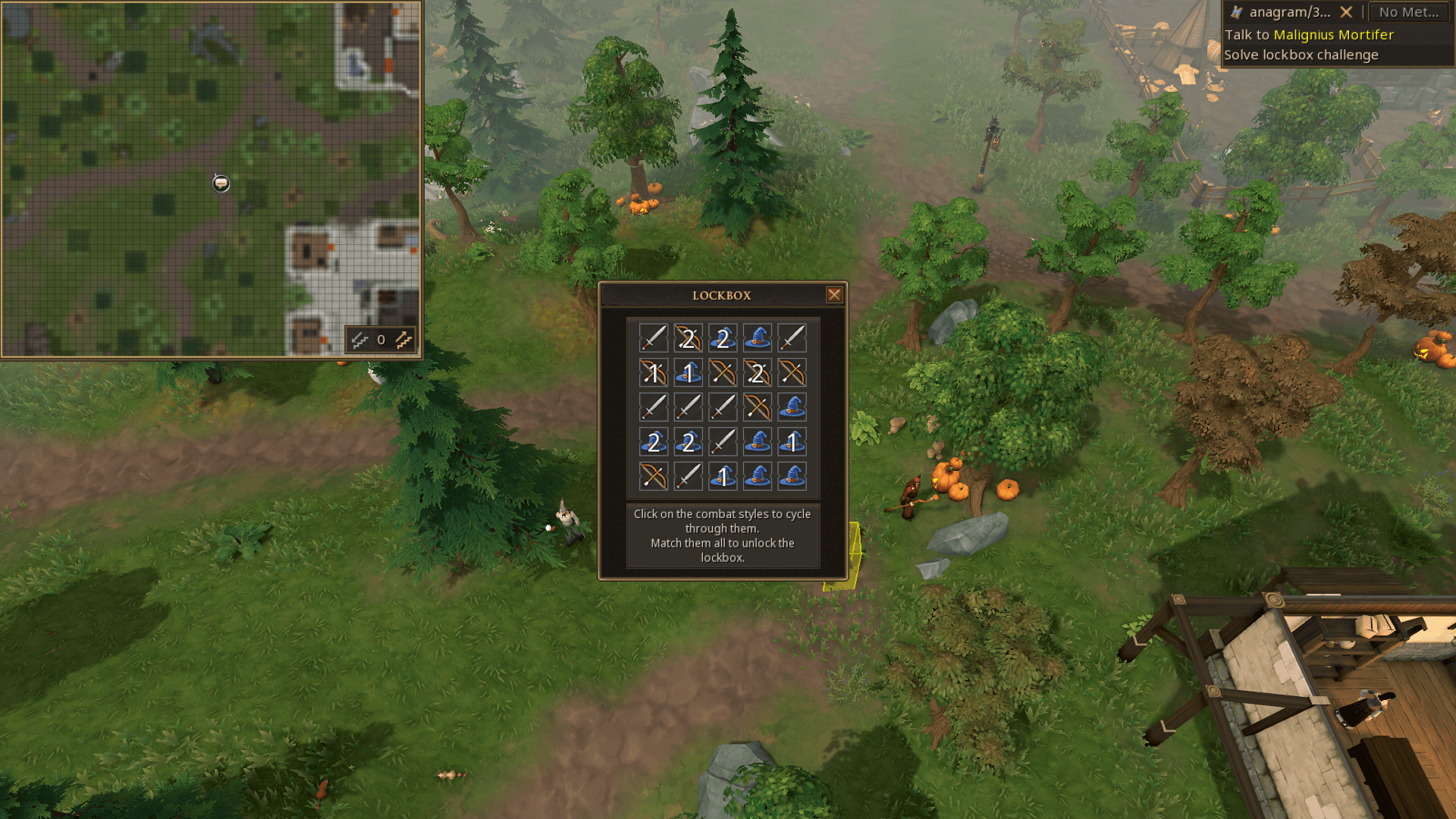
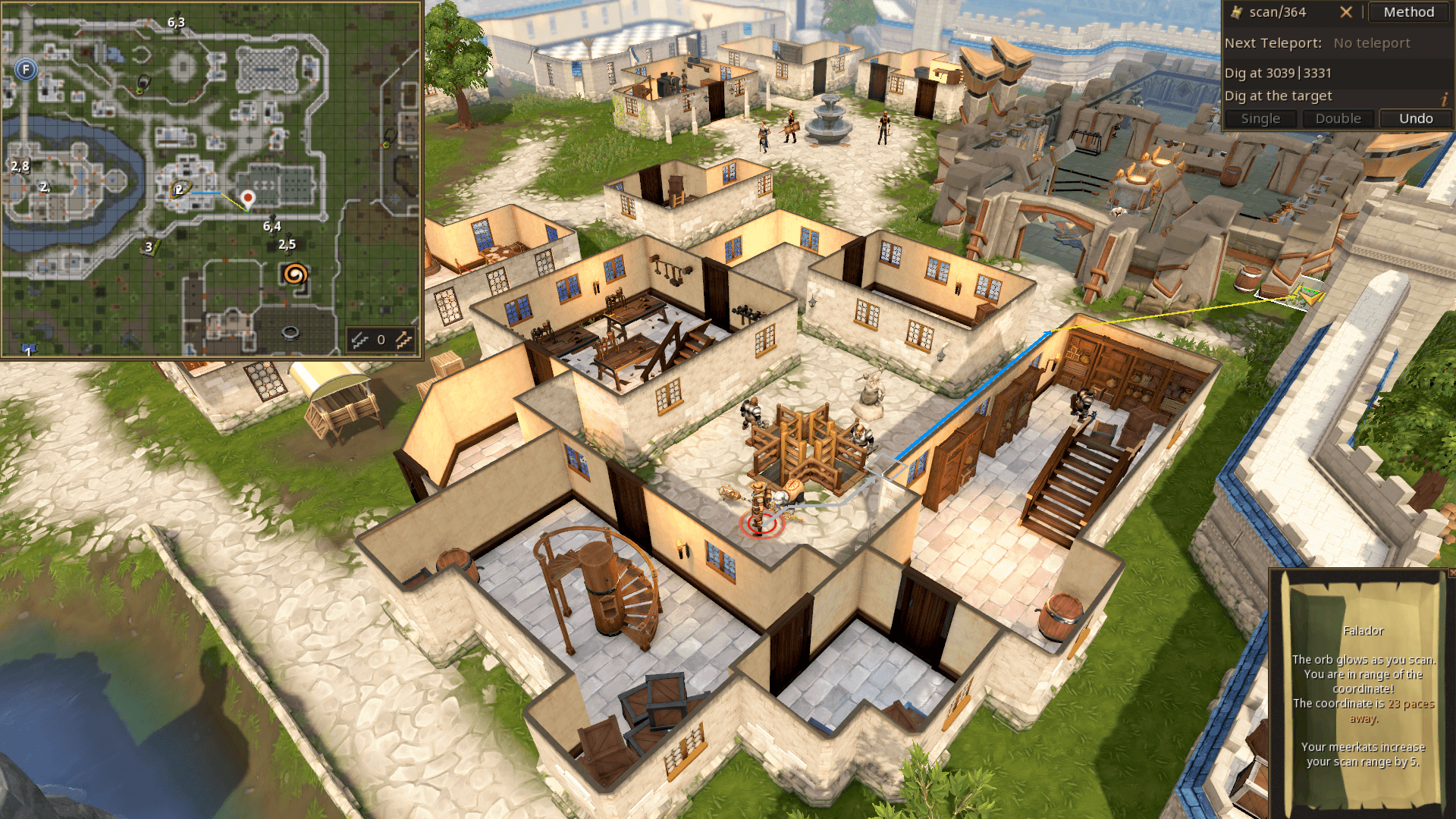
Important note: Clue Trainer is still in active development. While core features are complete, you may encounter bugs, instability or missing features. Zyklop will continue improving the plugin, and your feedback will help shape its development.
Developer Spotlight: Zyklop Marco
Clue Trainer has been a passion project of mine for several years now, originally starting as a simple interactive guide for scan clue strategies, so-called scan trees, intended only for myself. It quickly found appreciative users and a home in the Clue Chasers community, and evolved into a fully featured clue solving assistant for the Alt1 toolkit that has made an impact on the clue-solving meta. If you ever wondered why the Clue Chasers preset for elite clues includes a Sextant, Clue Trainer is the reason why.
Along the way, there were many interesting and challenging problems to solve: Optimizing screen reading for real-time puzzle overlays, implementing a state-of-the-art slider puzzle algorithm, and increasing the accuracy of the compass detector were three particularly rewarding instances.
The plugin version that releases today builds directly on the lessons learned from 82 versions of Clue Trainer for Alt1, which is why it starts at version 83. Those of you already familiar with Clue Trainer will feel right at home, but also notice a few additional comforts that were not feasible within Alt1.
For those of you who are new to Clue Trainer or to clues as a whole, now is the perfect time to jump in and become a Clue Chaser in preparation for next year's Grandmaster clues. The path suggestions painstakingly curated by my partner in crime, Ngis, will teach you how to dive through walls and how you can surge diagonally across a river by chopping a tree near Castle Wars.
While developing the plugin has not been without challenges, and we hit the limits of the API more than once, I'd like to thank the entire API team for their great work, for being receptive to feedback and occasional pushback, and for being great to work with overall.
Created by WerWolv
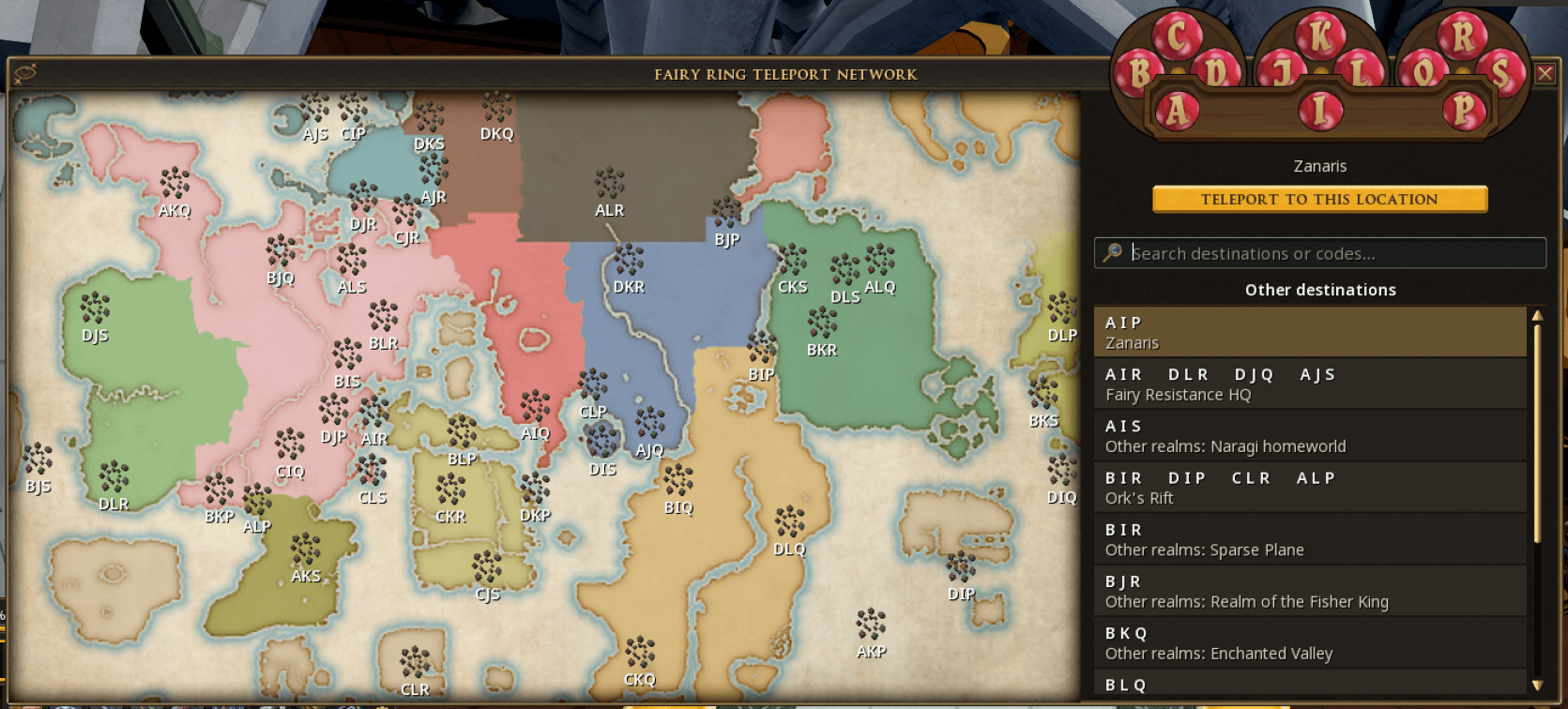
Better Teleport UIs replaces traditional teleport menus with handy visual world maps, making it easier to see exactly where you're heading. This should pair nicely with Clue Trainer for those of you looking to get all of those Clues finished.
This includes support for Fairy Rings, Drakan's Medallion, the Slayer Cape, Crystal Teleport Seeds and many more.
Developer Spotlight: WerWolv
Working on this was a lot of fun! Having played this game for over 15 years, it was really cool learning more about the internals of the game and fixing things that have been bothering me for years. Also, working so much with these interfaces, it was fun to see how inconsistent some things are in some areas.
There were some challenges with the API, but I love hacking around on hardware and software I use a lot. Basically, every device I get and every software I use has been modified in some way to fit my needs. Getting the ability to finally improve areas of RuneScape that have bothered me for years is a great feeling!
Created by TheJoshJ
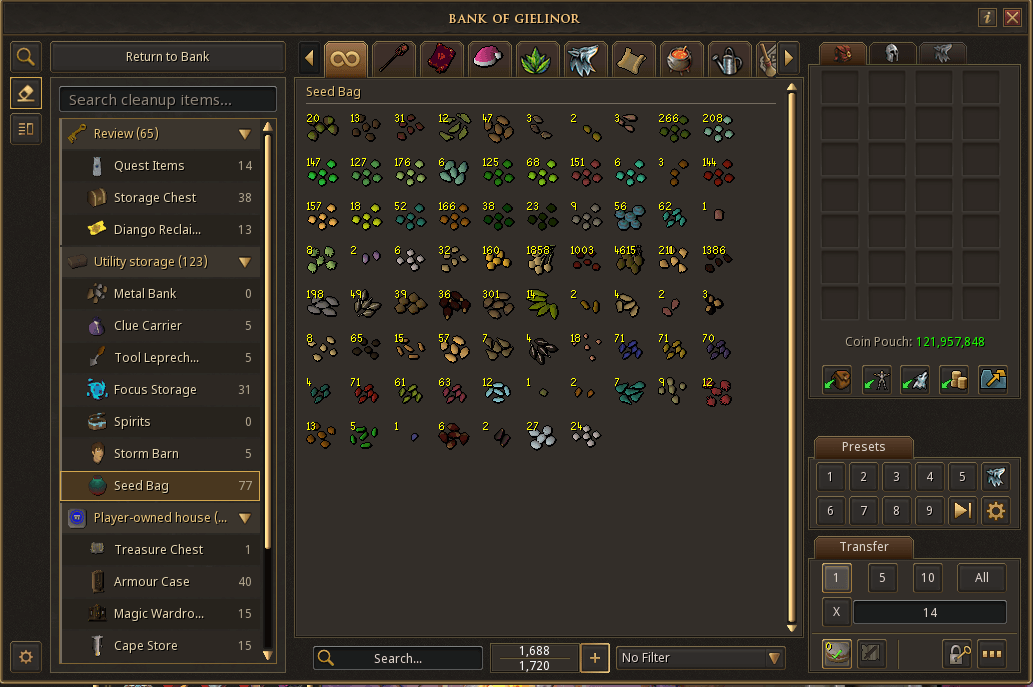
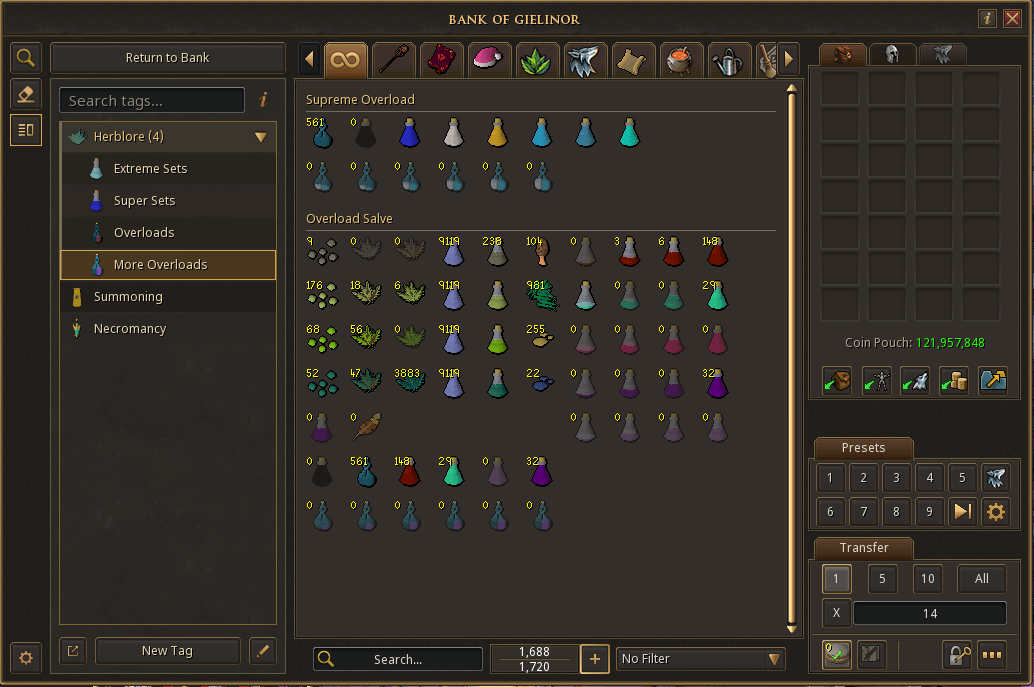
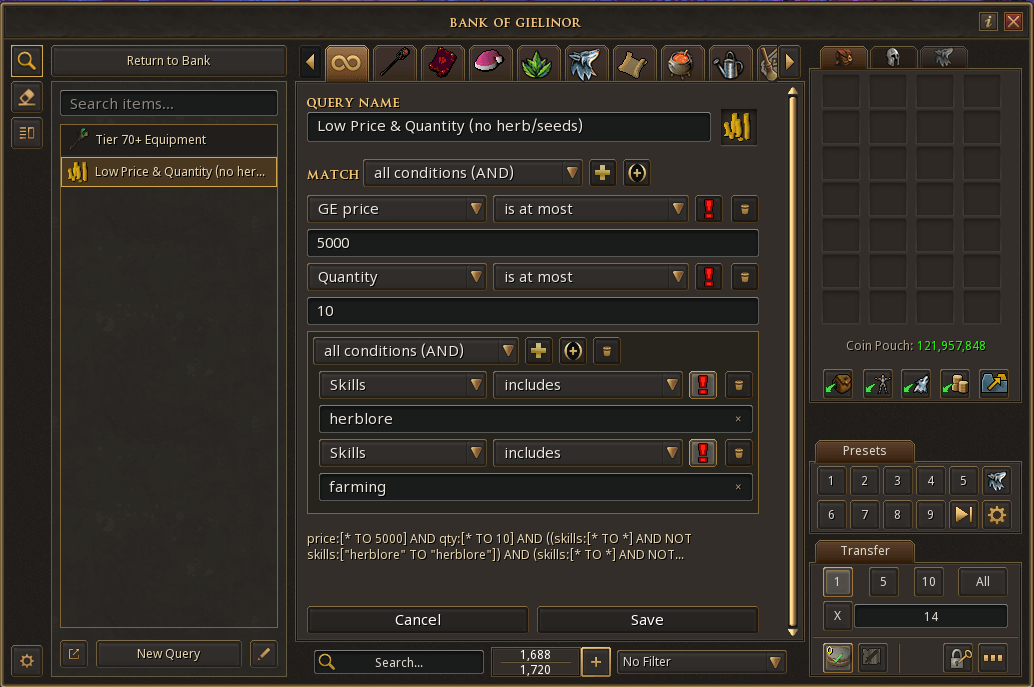
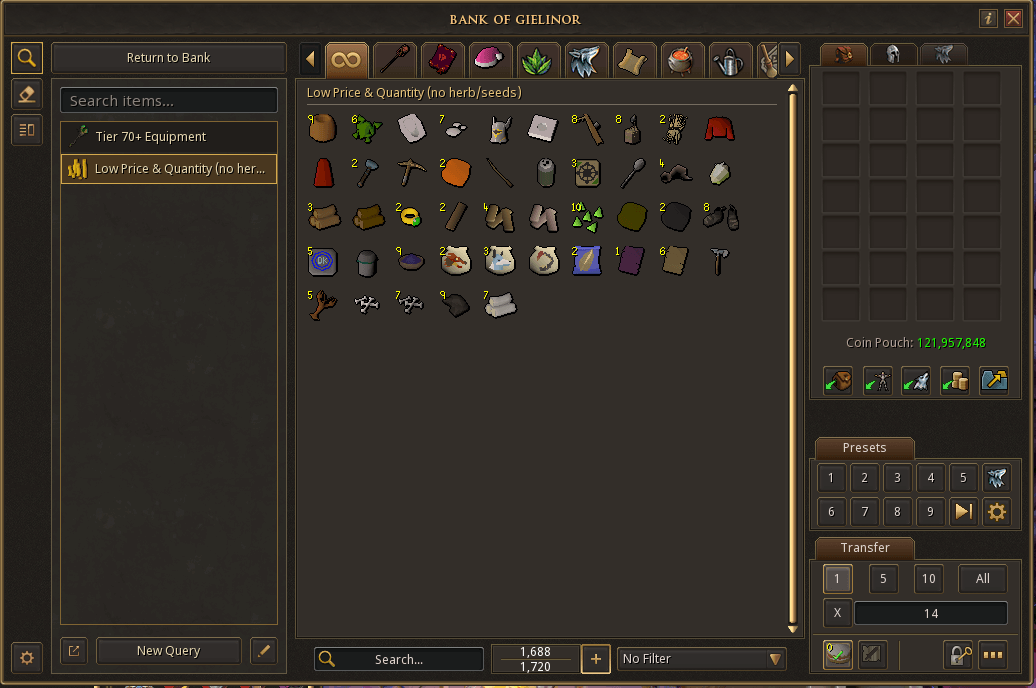
Josh has created four plugins to make organising, searching and managing your bank easier than ever.
- Bank Tags: Organise your items into custom tags, folders and layouts, which you can share with other players.
- Bank Cleaner: Find items that could be moved into alternative storage or reclaimed elsewhere to free up some precious bank space.
- Advanced Bank Search: Find exactly what you're looking for with powerful search filters, including item names, quantities, prices and more. Please note, Advanced Bank Search is based on an ongoing manual categorizations of items & data that can't be obtained from the client. If you notice that something is miscategorized or misclassed, please let the developer, Josh, know via the RuneQL Plugin thread so that the data set can be improved.
Whether you're a bank organization enthusiast, or just looking to clear out some clutter, there's plenty to explore.
Created by Pavy
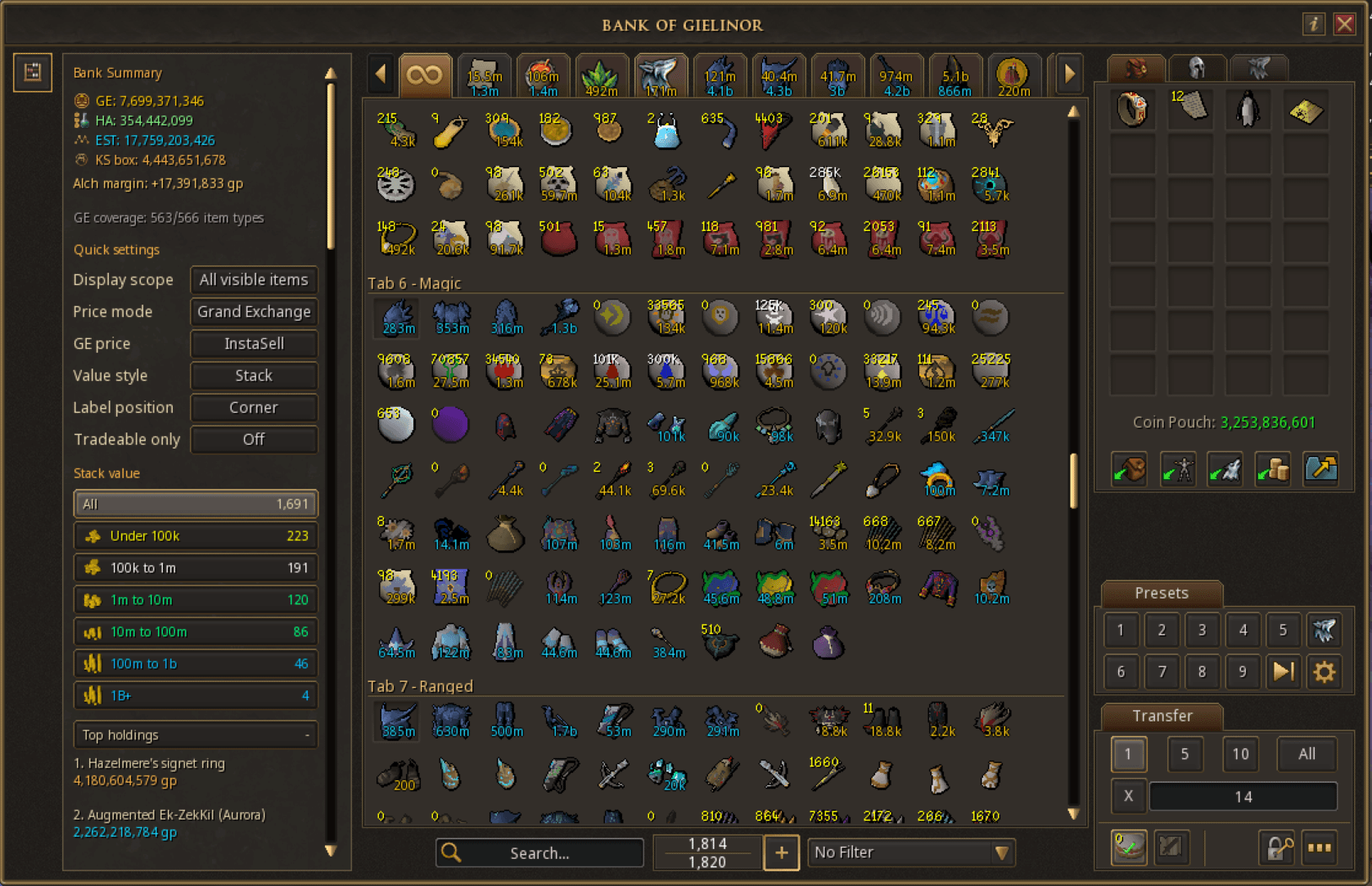
Wondering how much certain items in your bank are worth?
Bank Evaluator lets you see Grand Exchange and High Alchemy values directly in your bank, alongside your total wealth, most valuable items and potential High Alchemy profits. It even provides estimated values for supported augmented and dyed equipment. Stonks!
Created by Brad
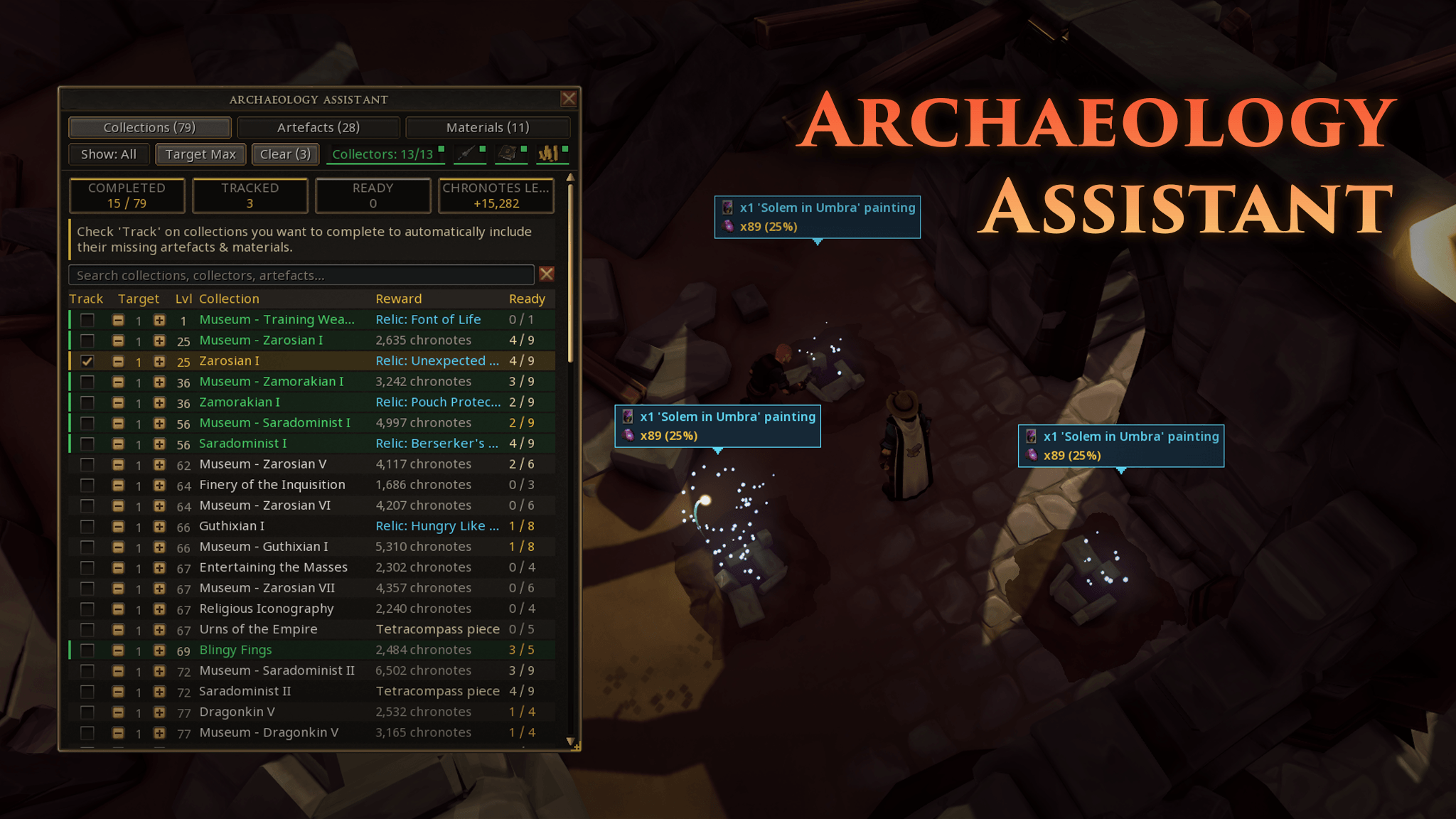
Keeping track of all your artefacts and materials can be a challenge, but Archaeology Assistant is here to lend a hand.
This plugin tracks your artefacts and materials across your various storage locations, calculates exactly what you're missing and highlights useful excavation spots directly in-game. This includes collection tracking, automatic syncing and live progress updates.
Developer Spotlight: Brad
I first stumbled across RuneScape on Miniclip as a kid. I probably only killed a few cows, but it completely blew my mind, and like everyone says, you never really quit. Over the years RuneScape has always been a game I come back to, and some of the most important people in my life (including my child's godparents) are people I met because of it. It even inspired me at a young age to pursue software engineering; today I work full-time as a software engineer supporting critical national infrastructure. As for the plugin itself, Archaeology is a skill I've always loved conceptually, but in practice I found it tough to keep track of all the collections, damaged artefacts, and material deficits. I used to rely on community spreadsheets from the RuneScape subreddit, which worked, but felt tedious. The chance to bring all of that natively into the client was too good to pass up.
My main goal was to make something that never gets in the way while you're training. It just sits alongside the skill, removes the spreadsheet friction, and lets you focus on excavating. Seeing everything come together directly in-game has been incredible.
One of the trickiest parts was accurately syncing all the different storage types (Backpack, Material Storage, Workbench Storage, and Bank) and handling all the edge cases around them, like distinguishing between dropping materials, restoring artefacts, banking, and handing collections in. A huge shout-out to PrettyUI, which made it easy to keep the plugin's look and feel consistent with the rest of the Plugin Hub, and to everyone in the Plugin Discord. If my career has taught me anything, it's to surround yourself with people smarter than you! Mod Jewel has also been fantastic to work with; I really appreciate the feedback, guidance, and how smooth he made the review process. And finally, a big thank-you to my wife for giving me the time to pursue this hobby, even when it looks suspiciously like my day job all over again!
Created by IMEllamental
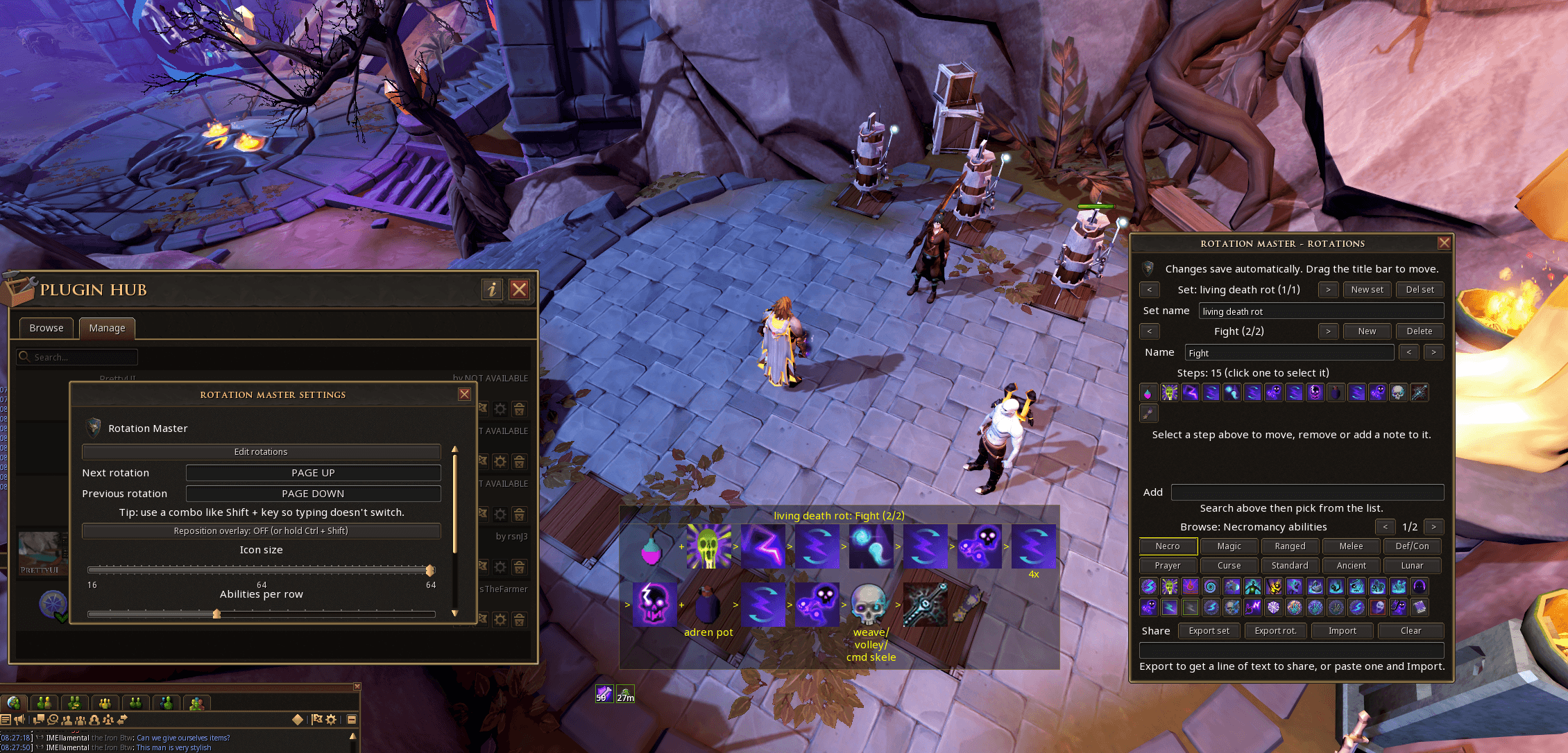
Looking to improve your rotations in PvM? This handy plugin lets you create and display custom ability rotations directly in-game, so you can practice without constantly needing to check your other monitor. You can even save different rotations and share your setups with other players.
Check out this video for how it works!
Accept marketing cookies to watch this video here.
Alternatively, watch on YouTube
Developer Spotlight: IMEllamental
I'm a full time developer, and an iron-main.
I've found the process of working on the plugins really smooth, there was so much helpful information and guidance in both the discord and the documentation. I had the plugin already in an Alt1 form so the logic and stuff was already there and converting it over was good.
The challenges I encountered were mostly around the in game sprites, luckily SereSelene's RSprite plugin solved a lot of those issues for me, which I think is a great example of how the dev community can work together and I'm really enjoying being part of that.
The main inspiration for making this plugin was, I was trying to follow a rotation on my second screen, and kept dying to Rasial (skill issue). I wanted a way to display the rotation over the game so I didn't have to look away. I made the initial version and found it really useful and it grew into a way to share rotations with others as well as have multiple rotations for bosses with multiple phases.
Created by Zippilipy
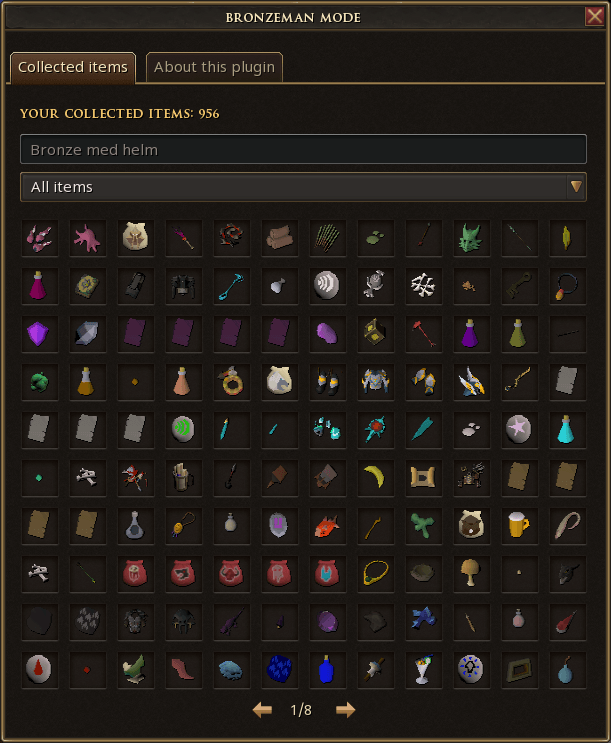
Some of you may already be familiar with Bronzeman mode from Old School RuneScape! For those who aren't, think of it as a new way to experience RuneScape, sitting somewhere between a regular account and an Ironman.
With Bronzeman, you need to unlock items through gameplay before you can purchase them on the Grand Exchange. There are also restrictions on trading and picking up other players' items, so you'll have to earn your unlocks yourself!
Items can be unlocked through skilling, PvM, shops and more, giving you plenty of freedom in how you approach the challenge. Anything you've already obtained in your inventory or bank will also be unlocked automatically when you first enable the plugin.
Even if you're not planning to take on the challenge yourself, we reckon this plugin could make for some pretty entertaining content, especially in the build up to December 2nds Return to RuneScape moment!
Developer Spotlight: Zippilipy
Working on this project was extremely fun! This is by far my biggest project I've ever worked on as a student. It's been very interesting thinking about what challenges could exist and how to solve them, and to adapt to the API!
Did I encounter challenges? Tons of them! Some solved quite elegantly, others... not quite. For the interested, ownership of an item does not belong to the actual item on the ground, but is only received once whenever that item's drop event is received. So you have to store this information somewhere, and it turned out to be quite a challenge on how to do this, since "ownership" isn't defined how you would expect either.... This means there are actually some technical details which won't work how you expect, I'm hopeful that this doesn't become a problem for users of the plugin, though.
There are certainly more challenges to overcome as potential bugs may be discovered, and features requested, but I'm going to work to make the plugins as good as it can be!
I'm a student studying computer science and have always thought coding to be very enjoyable, so being able to work on something that other people will enjoy has truly been a dream of sorts. I worked on quite a niche plugin for OSRS, and that was very fun so I'm really happy I've been able to work on RS3 as well.
We're also welcoming another dependency plugin with this batch!
These are behind-the-scenes tools that help other plugins function properly. You might not interact with them directly, but they're an important part of keeping everything running smoothly.
RSprite
Created by SereSelene
RSprite is a handy library that helps other plugins find and display in-game sprites safely and reliably. If another plugin requires RSprite, the Plugin Hub will automatically install it for you.
Bank Utils Core
Created by TheJoshJ
This is a behind-the-scenes plugin that brings Bank Tags, Cleaner and Advanced Bank Search together in one convenient bank interface. Its also utilised by Pavys Bank Evaluator plugin.
RuneQL
Created by TheJoshJ
RuneQL is a searchable catalog of every item in RuneScape that includes data otherwise not obtainable from within the client, such as Grand Exchange Price, associated skill, etc.
Whats Next?
The next batch of plugins (Batch 4) will be coming in December. However, we dont have a concrete date yet as were still working out our plans in conjunction with the big December 2nd moment for return to RuneScape.
Some of the plugins we were looking at for batch 3 didnt have enough time to be moderated. They will be moved into the next round of plugins. Well keep you posted!
Back to top
Sources
Stay on top of every update — find all the latest patch notes and gaming news at XP Gained. Join our Discord for live patch note alerts and discussion.
Written by
Nathan LeesGaming journalist and founder of XP Gained. Covering patch notes, breaking news, and updates across 160+ games.
Related Posts
RuneScape: Dragonwilds Our 2027 Plans - Fixes Notes (19th November 2026)
RuneScape: Dragonwilds developers prioritise bug fixes and quality-of-life updates over new content in 2027.
Old School RuneScape Quest Month Week 3 & TFA Notes (18th November 2026)
Jagex reverted The Fractured Archive duo HP buffs, added practice mode, and released two new Quest Month quests.
RuneScape Remastered Journey Preview Round Up Notes (12th November 2026)
Jagex releases a preview for the RuneScape Remastered Journey update launching 2 December, detailing visual and gameplay changes.