s&box 26.05.20 Patch Notes (20th May 2026)
s&box's latest update adds random item drops, a platform-wide chat overlay, and new performance analytics to help the team target CPU bottlenecks.
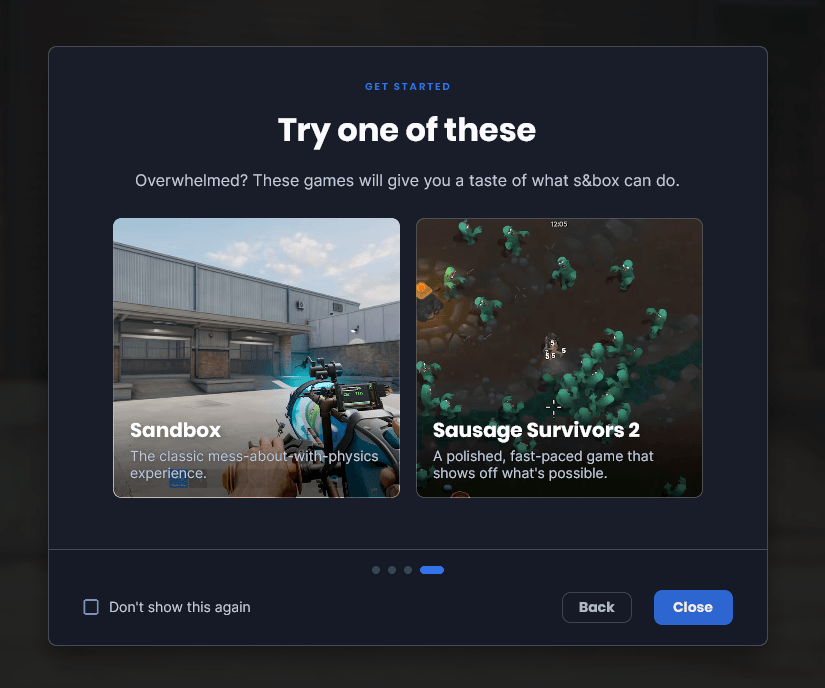
The biggest thing in update 26.05.20 isn't a feature, it's an admission. Facepunch have added a welcome screen because, by their own account, new players keep misunderstanding what s&box actually is. It's a blunt self-assessment, and I respect them for it.
Beyond onboarding, there's a new random drop system that hands out tradeable items based on play behaviour, reviews, and game ratings, with one drop available per week. Facepunch are building their own backend for it rather than leaning on Steamworks, specifically so they can reward positive community behaviour over raw playtime down the line. The platform chat overlay is also new this patch: instead of every developer rolling their own chat solution, there's now a default system with muting, word filtering, and blocking built in. The voice mixer fix is similarly overdue since the volume slider was previously ignored by most games entirely.
On the technical side, the team have started collecting GPU frametime data alongside existing CPU profiling, giving them a hardware-tier breakdown of where players are actually bottlenecking. Their early data points firmly at CPU submission overhead rather than GPU load, which should focus optimisation efforts considerably. Facepunch describe this as a lighter "hackweek" update, and the scope reflects that. Here's everything that changed.
Full Patch Notes
▲ Buff▼ Nerf◆ TweakA new update has been released, you can view the full changes on our blog post.
https://sbox.game/news/update-26-05-20
Welcome Screen
As referenced in last week's analysis of the Steam Reviews, there are a lot of misunderstandings of what s&box is and what it isn't. We haven't done a good job of explaining ourselves on the game side. It feels like we have done a good job of explaining ourselves to developers, but have trood in a bunch of dog shit when explaining it to gamers.
This week I've added a welcome screen to the game to explain some of the unobvious. This screen will pop up on first run, explain a few things, and make a suggestion to play Sandbox Mode or Sausage Survivors 2. The hope being that people who are coming here for the first time will read it and their first experience will be a good one.
Obviously, no-one reads anything any more. No-one is even reading this. They're probably being told what it says in a youtube video, or a tiktok video with fart noises and someone playing tetris at the side to make sure they don't get bored. But you know, at least we can say we tried.
Random Drops
We now have a random drop system. There are certain criteria to meet to be eligible for a drop, and once you reach that threshold you'll receive a random item. These items can be traded and sold, like any other item. You can get one of these drops every week.
We want to do more with this system in the future to encourage positive community interactions, rather than purely play time. For this reason we've made our own programmable backend for it, rather than using the existing Steamworks system.
Right now your chances of drops are based on factors like games played, new games played, time played, reviews and game ratings. We'll tweak this in the future so that people who are positive community members will be more eligible for rarer rewards. We'll be keeping an eye on it too, to make sure it's not being botted and gamed.
You can see which skins have been dropped at the bottom of the Skin Metrics page.
Tutorials
This site now has developer tutorials. This started as a way for us to write smaller tutorials without filling the documentation without too much noise, but it's obviously way more useful if the community can edit them too.
This is accessible at https://sbox.game/learn - and is something we'll be contributing to and will be improving over time. Let us know what you think!
Trade Protection
Trade Protection is active for the Steam Inventory items in s&box. You can read more about it at that link.
Basically there's no reason not to have it, and it's better to have it enabled sooner rather than later, so if we do stuff in game with the items we can show that they're trade protected instead of doing it retroactively.
Platform Chat Overlay
Everyone had to implement their own chat into their games, that was stupid. Now there's a default chat, this makes a consistent platform experience, players can turn chat off, mute other users and filter naughty words.
For new projects this is turned on by default, for older projects this is opt-in. It can be toggled on and off in the project settings.
You can use `Chat.AddText( ... )` to add system text for notifications, or whatever you'd like.
This has blocking behaviour built-in, and you can disable the chat in your settings menu. You can listen to chat messages using `IChatEvent.OnChatMessage`, so if you want to filter for stuff like team chat, add commands to your game, you can do that. We have potential plans for first-party commands / chat channels in the future.
Voice Mixer
We have a "Voice" volume slider in our settings, but we were relying on game developers to implement this functionality themselves. This was shit, and as a result it didn't work for most games...
Now all voice transmission MUST go through the Voice Mixer, or some Mixer that is a child of the Voice Mixer.
That way games can no longer circumvent the "Voice" volume slider, and both players and streamers alike can rejoice in the fact that they won't have to hear another soul once muted.
Performance Bottlenecks
Before we optimize anything, we need to know which areas to focus on, which areas are holding players back. Is it the GPU? Is it the CPU? Is it physics, is it animation? The answer changes dramatically depending on the hardware people are running.
This update we started collecting GPU frametime in our performance analytics. Combined with our existing CPU profiling we can now classify every player session as either GPU-bound or CPU-bound, and iif CPU-bound pinpoint which stage (render, physics, animation, particles, etc.) is the culprit.
I've then added a new page to our metrics, performance bottlenecks - this groups players into hardware tiers and shows the dominant bottleneck for each CPU x GPU combination.
This gives us a clear picture that we are almost always CPU bound submitting rendering work to the GPU, the GPU never struggles to actually run this work.
You can also filter by game and map to see how specific content shifts this balance - a physics-heavy game might bottleneck the CPU, where as a very art heavy map might bottleneck on the GPU.
The sample sizes are low right now, as the update rolls out we should have a very clear picture going forward.
Summary
A smaller update this week because of hackweek but we still got a lot of important stuff done in just a few days.
We've been tweaking discovery still on the backend, pushing the good stuff forward and dragging the slop to the bottom. The welcome screen should help new players get a more positive experience too.
Tutorials are a vital part of the ecosystem, we've already been seeing many new developers trying out s&box, learning the toolset and creating new experiences for everyone to play.
The performance data is leading the way with optimizations, now we know where the biggest bottlenecks are for all users across all hardware, we know where to focus our efforts.
We're getting what needs to be done, done. No slowing down - see you next week. 💪
Changelog
🎁 Added
- Default platform chat system - games can toggle this on/off in project settings, and hook into it with IChatEvent
- Welcome screen shown on first game startup to communicate what s&box is
- `SoundFile.FromOgg` for loading OggVorbis sound files
- `GpuBuffer.CopyTo` for GPU-side buffer-to-buffer copies
- `RenderAttributes.Set(uint)` overload for correctly passing unsigned integer attributes to shaders
- `CameraComponent.RenderToBitmap` overload with optional UI rendering parameter
- Clutter LOD support for instanced models — models in the same LOD level are batched into a single draw call
- Voice Mixer added to default mixers; Voice Component now restricted to only use Voice Mixer or sub-mixers, ensuring the voice volume setting always works
- Terrain storage grid visualization when painting materials
- UI panels can perform custom drawing again via `IPanelDraw` and `Draw(CommandList)`
- Backend notice system for item drops
🧼 Improved
- Trace results no longer allocate arrays, reducing GC pressure — use `HasTag()` instead of the now-obsolete `.Tags` property
- Redesigned package modal to match the rest of the UI
- Doo methods renamed to include "Doo" in their names for clarity and to avoid variable name conflicts (old names remain as `\` extension methods)
- `GpuBuffer.SetData()` now accepts `ReadOnlySpan` instead of requiring `Span`
- SceneTree search no longer filters out prefab contents
- Video settings are now applied on first launch, fixing potential poor performance before settings are saved
- Heightfield collision no longer snags player movement
- `TerrainStorage.Resolution` setter made private — use `SetResolution()` instead
- `GameObjectSystem` properties now respect property initializers and `\` attributes
- Stale config values are now removed on failed deserialization
- `LoadAllGameResource` can now replace existing resources when loading addons or syncing network files
- Disabled opaque fade being wrongly enabled on on GameOverlays
🪛 Fixed
- Backwards seek (e.g. from `SoundHandle.Time`) causing an infinite loop when hitting the very start of a sound
- Opaque Fade not working without MSAA and not rendering properly in shadows
- MSAA edges appearing in translucent `screenshot_highres` captures and scene panels
- `CameraComponent.RenderToBitmap` UI scaling incorrectly to the bitmap size
- Pivot tool grid snapping when dragging fast
- Editor shortcuts getting stuck after ALT+TAB or pressing the WIN key while navigating the viewport
- Square particles on some impact effects due to incorrect texture paths
- Vertex painting not working with custom blendable shaders
- System scene overwriting game object systems of the actual scene
- Clothing hide parameter selecting wrong bodygroup for human models
- Scene system render stats breaking with multiple render scopes
- TreeView item not committing pending name change when unfocused
- Screenshot UI resolution not matching when resizing - Thanks @Matt9440
Sources
Stay on top of every update — find all the latest patch notes and gaming news at XP Gained. Join our Discord for live patch note alerts and discussion.
Written by
Nathan LeesGaming journalist and founder of XP Gained. Covering patch notes, breaking news, and updates across 160+ games.
Related Posts

s&box 26.08.05 Patch Notes (5th August 2026)
The platform jumps to Vulkan 1.3, switches shader compilers, adds DLSS upscaling, and introduces Streamer Mode for content creators. All without raising PC requirements.
s&box 26.06.24 Patch Notes (24th June 2026)
Discovery gets a social overhaul, Rust content arrives, and shader optimization nets serious frame time gains.

s&box 26.06.17 Patch Notes (17th June 2026)
Mini Motors debuts as the first in a series of small, polished games. Mounts integration hits the main menu, and code archives are gone for good.